I Built an AI Debugger That Never Forgets
Every developer knows this cycle: you fix a bug, move on, and three weeks later hit the exact same error in the same file. You spend 30 minutes debugging something you already solved. Your IDE's AI assistant doesn't help. It has no memory of your past fixes.
This is what Cognee calls "AI Amnesia." LLMs are fundamentally stateless. They process your prompt, generate a response, and forget everything. Ask about a bug you discussed yesterday and it starts from zero. Cognee ran a hackathon to solve this, and I built something that does.
What Bug Whisperer Does
Bug Whisperer is an AI debugger with persistent memory. Every bug you encounter gets analyzed, fixed, and stored in a knowledge graph. When a similar error appears, even with different wording, it recalls the root cause and fix from past sessions.
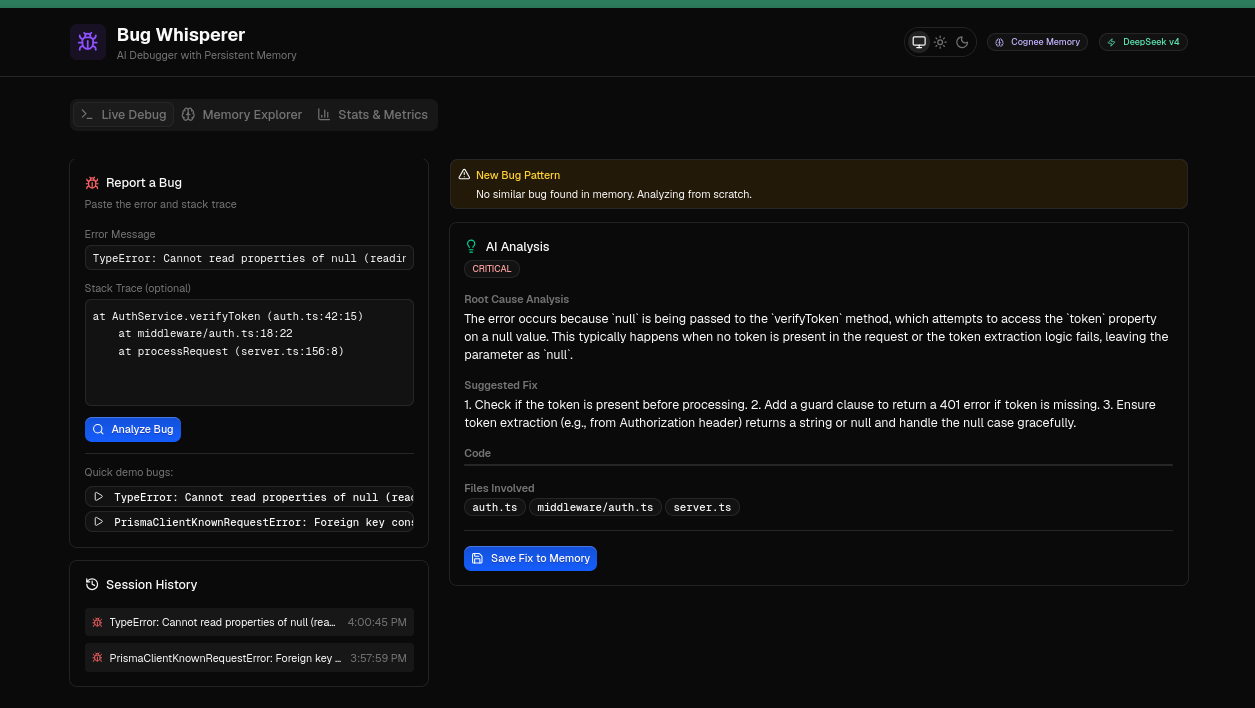
The system has three interfaces:
- CLI (
bw): pipe errors directly from your terminal, no copy-paste needed - Web dashboard: visual interface with live debug, memory explorer, and metrics
- REST API: integrate with CI/CD pipelines or monitoring tools
The core metric: recall hit rate starts at 0% (cold start) and climbs to 66%+ as the knowledge graph grows. The system demonstrably gets smarter over time.
How Cognee's Memory Layer Works
Cognee provides a hybrid graph-vector memory layer. Here's what that means in practice:
Building Memory with remember()
When you analyze a bug, the entire analysis gets stored as a structured graph node. Not just the error message. The root cause, the fix, code snippets, files involved. Nodes are connected by relationships: Error → RootCause → Fix → Files.
await cognee.remember(f"""
BUG RECORD
Error: {error_message}
Root Cause: {root_cause}
Fix: {fix_description}
Files: {files_involved}
""")
Finding Matches with recall()
When a new bug comes in, Cognee runs a hybrid search. First, vector embeddings find semantically similar errors: "null has no property 'id'" matches "Cannot read properties of null" even though the text differs completely. Then, graph traversal follows the relationships to surface relevant root causes and fixes.
results = await cognee.recall(query_text=error_message)
# Returns: root causes, fixes, related files from past similar bugs
The first time I saw Cognee match "null has no property 'id'" to a previously stored "Cannot read properties of null (reading 'token')" fix, I understood why hybrid search matters. Vector similarity catches what keyword matching misses entirely.
The Feedback Loop
Every recall hit increments a confidence counter. Over time, the system builds a track record of how often it correctly matches new errors to stored fixes. This self-improving loop is what the hackathon judges look for.
Architecture Decisions (and What I'd Do Differently)
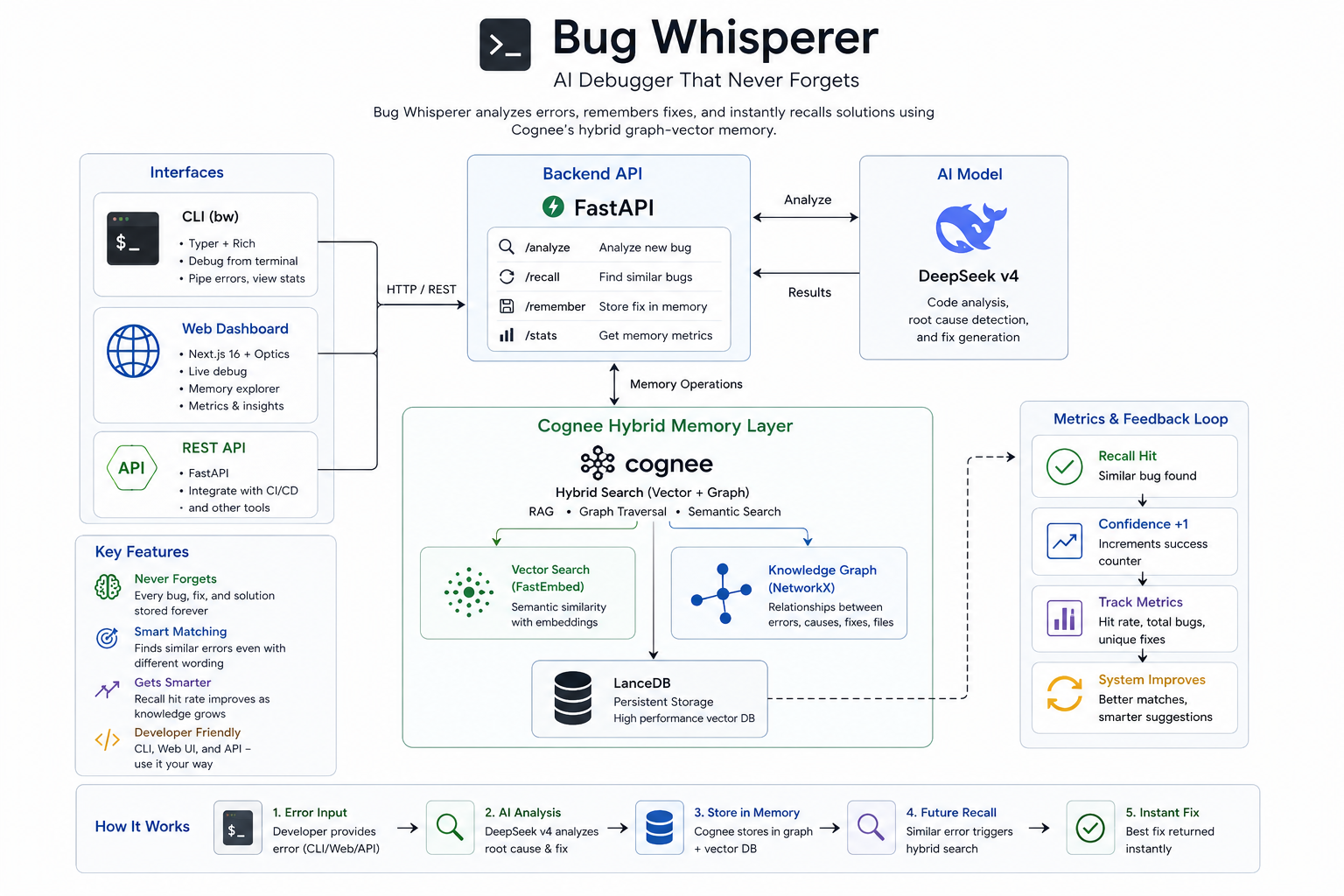
The backend is FastAPI wrapping Cognee's memory API. CLI uses Typer + Rich. Frontend is Next.js 16 with the Optics Design System.
CLI (Typer) ─┐
             ├── FastAPI ── Cognee (LanceDB + NetworkX + Fastembed)
Dashboard ───┘                    │
              DeepSeek v4 ────────┘
Every component choice had a reason:
- DeepSeek v4 over GPT-4: already had the API key, excellent at code analysis, OpenAI-compatible
- Fastembed over OpenAI embeddings: zero cost, runs locally, fast enough for error matching
- LanceDB + NetworkX over Neo4j: zero-config, no separate database server needed
- Typer + Rich over argparse: type-hint-based CLI with formatted terminal output
Where Cognee's API Surprised Me
Cognee v1.2.2's recall() is semantic search, not a listing API. There's no built-in way to say "show me everything in memory." I had to build a persistent counter and entry log (stats.json) to track metrics and power the Memory Explorer tab. This turned out to be useful. It forced me to think about what metrics actually matter rather than dumping a raw graph.
Auto-Save vs. Manual Save
My first version had a "Save Fix to Memory" button. It made sense on paper: verify the fix before storing. In practice, nobody debugging in a terminal switches to a browser to click save. Auto-saving every analysis keeps the CLI and dashboard in sync and removes friction from the core loop. I should have started with this.
The CLI Is Where Developers Actually Live
The bw command slots into existing workflows without disrupting them:
# Pipe your failing test output directly
npm test 2>&1 | bw pipe --lang typescript

# Or analyze a specific error
bw analyze "TypeError: Cannot read properties of null (reading 'token')" \
  --stack "at AuthService.verifyToken (auth.ts:42:15)" \
  --lang typescript

# Check your stats
bw stats
The pipe command extracts errors from terminal output using language-specific regex patterns, then sends each one through Cognee's memory pipeline. Tested against real output from pytest failures, npm test runs, and Python tracebacks. The error extraction works reliably for Python and JavaScript/TypeScript. Other languages fall back to a generic pattern that catches most stack traces but occasionally misses edge cases.
Deployed and Live
Bug Whisperer is live. You can use it right now. No local setup required.
Web Dashboard: bug-whisperer.netlify.app
CLI: install in one command:
pip install git+https://github.com/imadnan4/Bug-Whisperer.git#subdirectory=backend

# Point to the live Railway backend
export LLM_API_KEY=your_deepseek_key
export LLM_ENDPOINT=https://api.deepseek.com/v1
export BW_API_URL=https://backend-production-efdc.up.railway.app

# Start debugging
bw analyze "TypeError: Cannot read properties of null (reading 'token')"
bw stats
The backend runs on Railway (FastAPI + Cognee), the frontend on Netlify (Next.js + Optics). Both auto-deploy on every git push.
Run It Locally
If you'd rather run everything locally:
git clone https://github.com/imadnan4/Bug-Whisperer.git
cd Bug-Whisperer/backend
cp .env.example .env  # add your DeepSeek API key
uv venv && source .venv/bin/activate
uv pip install cognee fastapi uvicorn "cognee[fastembed]"
uvicorn src.main:app --port 8000

# In another terminal
cd backend && source .venv/bin/activate
uv pip install -e .
bw analyze "TypeError: Cannot read properties of null (reading 'token')"
Built for The Hangover Part AI Hackathon by WeMakeDevs × Cognee. Open source under MIT.